
Sudurpaschim Pradesh Computer Operator Syllabus PDF | 4 & 5 Level
Sudurpaschim Pradesh Level 5 Computer Operator Syllabus
The Level 5 curriculum is designed to test in-depth technical knowledge, advanced data handling, and the legislative regulations required of an officer-level IT administrator.
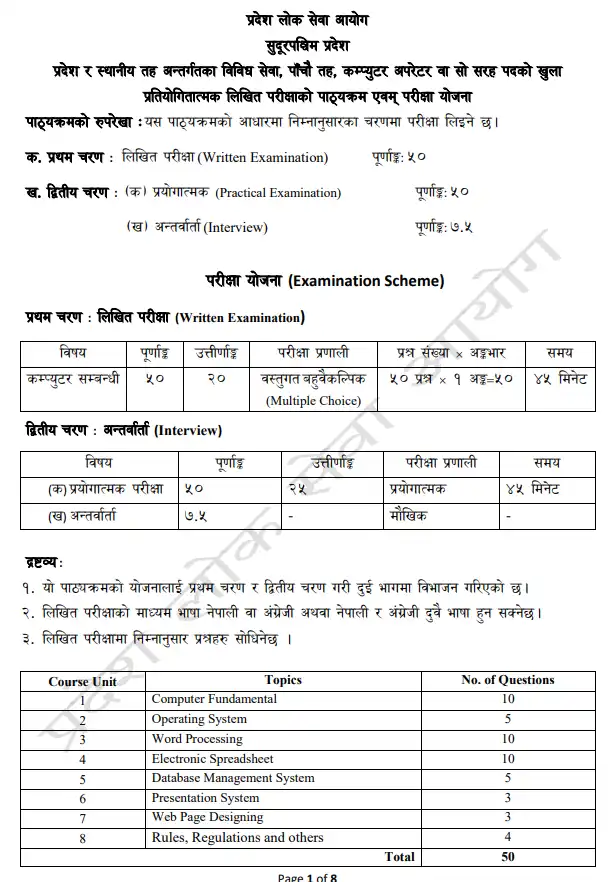
Unit 1: Computer Fundamentals
- 1.1. Computer: Definition, History, Generation, Characteristics, Types & Applications.
- 1.2. Overview of a computer system:
- 1.2.1. Data, information, knowledge, and data processing.
- 1.2.2. Hardware:
- 1.2.2.1. Definition of Hardware.
- 1.2.2.2. Input Unit: Keyboard, Mouse, Scanner, etc.
- 1.2.2.3. CPU: Arithmetic Logic Unit (ALU), Control Unit (CU), Memory Unit (MU).
- 1.2.2.4. Output Unit: Monitor, Printer, etc.
- 1.2.2.5. Storage devices: Primary & Auxiliary Memory (Floppy Disk, Hard Disk, Compact Disk, DVD, Flash disk, etc.).
- 1.2.2.6. Others: Network card, Modem, Sound card, etc.
- 1.2.3. Software:
- 1.2.3.1. Definition & Types of Software.
- 1.2.3.2. Programming Language.
- 1.2.4. Liveware.
- 1.2.5. Firmware and Cache Memory.
- 1.3. Setting & protection of Computer Room and Computer.
- 1.4. Concept of Computer related threats (virus, worms, Trojan, phishing, etc.) remedies, and protection.
- 1.5. Concept of Multimedia.
- 1.6. File Management basic:
- 1.6.1. Physical Structure of the disk.
- 1.6.2. Concept of File and folder.
- 1.6.3. Wildcards and Pathname.
- 1.6.4. Type of files and file extensions.
- 1.7. Computer Networking:
- 1.7.1. Introduction to Networking.
- 1.7.2. Types of Network (LAN, MAN, WAN, etc.).
- 1.7.3. Concept of E-mail / Internet / Extranet / Intranet, World Wide Web (WWW), VPN.
- 1.7.4. Familiarity with internet browsers (e.g., Internet Explorer, Firefox, Opera, Safari, Google Chrome, etc.).
- 1.7.5. Introduction to IP address, subnet mask, and default gateway.
- 1.7.6. Introduction to Network Media, Topology, and Protocol.
- 1.7.7. Setting Up Microsoft Network.
- 1.8. Number Systems:
- 1.8.1. Introduction to binary, octal, decimal, and hexadecimal number systems.
- 1.9. Introduction to ASCII and Unicode standards.
Unit 2: Operating System (OS)
- 2.1. Introduction to Operating System.
- 2.2. Types of Operating System.
- 2.3. Functions of Operating Systems.
- 2.4. Command line operation: copy command, move command, command to view and set different file attributes, etc.
- 2.5. Windows:
- 2.5.1. Introduction to GUI.
- 2.5.2. Introduction of Windows Operating System:
- 2.5.2.1. Basic Windows Elements: Desktop, Taskbar, My Computer, Recycle Bin, etc.
- 2.5.2.2. Starting and shutting down Windows.
- 2.5.2.3. File Management with Windows Explorer.
- 2.5.2.4. Windows applications: Control Panel, Character Map, Paint, etc.
- 2.5.2.5. Finding files or folders and saving the result.
- 2.5.2.6. Starting a program by command line operation.
- 2.5.2.7. Changing window settings: Adding/Removing programs, Clearing the contents of document menu, Customizing the taskbar, Control panel items.
- 2.5.2.8. Creating shortcuts (icons) on the desktop.
- 2.5.2.9. System tools: disk scanning, disk defragmenter, backup, restore, format.
Unit 3: Word Processing (MS Word)
- 3.1. Concept of Word Processing.
- 3.2. Types of Word Processing.
- 3.3. Introduction to Word Processor:
- 3.3.1. Creating, Saving, and Opening documents.
- 3.3.2. Elements of Word Processing Environment: Menu, Toolbars, Status bar, Rulers, Scrollbars, etc.
- 3.3.3. Copying, Moving, Deleting, and Formatting Text (Font, Size, Color, Alignment, line & paragraph spacing).
- 3.3.4. Finding and Replacing Text.
- 3.3.5. Familiarity with Devnagari Fonts.
- 3.3.6. Creating lists with Bullets and Numbering.
- 3.3.7. Creating and Manipulating Tables.
- 3.3.8. Borders and Shading.
- 3.3.9. Use of Indentation and Tab Setting.
- 3.3.10. Creating Newspaper Style Documents Using Columns.
- 3.3.11. Inserting Header, Footer, Footnotes, Endnotes, Page Numbers, File, Page break, Section break, Graphics, Pictures, Charts, Word Art, Symbols & Organization Chart.
- 3.3.12. Opening & Saving different types of documents.
- 3.3.13. Changing Default settings.
- 3.3.14. Mail Merge.
- 3.3.15. AutoCorrect, Spelling and Grammar Checking, and Thesaurus.
- 3.3.16. Customizing menu & toolbars.
- 3.3.17. Security Techniques of Documents.
- 3.3.18. Master Document, Cross Reference, Index, Table of Contents.
- 3.3.19. Setting Page Layout, Previewing, and Printing Documents.
Unit 4: Electronic Spreadsheet (MS Excel)
- 4.1. Concept of Electronic Spreadsheet.
- 4.2. Types of Electronic Spreadsheet.
- 4.3. Organization of Electronic Spreadsheet application: Cells, Rows, Columns, Worksheet, Workbook, and Workspace.
- 4.4. Introduction to spreadsheet application:
- 4.4.1. Creating, Opening, and Saving Workbooks.
- 4.4.2. Elements of Electronic Spreadsheet Environment: Menu, Toolbars, Status bar, Rulers, Scrollbars, etc.
- 4.4.3. Editing, Copying, Moving, and Deleting Cell Contents.
- 4.4.4. Familiarity with Devnagari Fonts.
- 4.4.5. Formatting Cells (Font, Border, Pattern, Alignment, Number, and Protection).
- 4.4.6. Formatting Rows, Columns, and Sheets.
- 4.4.7. Using Formulas – Relative Cell and Absolute Cell Reference.
- 4.4.8. Using basic Functions.
- 4.4.9. Generating Series.
- 4.4.10. Changing default options.
- 4.4.11. Sorting and Filtering Data.
- 4.4.12. Summarizing Data with Subtotals.
- 4.4.13. Creating Charts.
- 4.4.14. Inserting Headers and Footers.
- 4.4.15. Spell Checking.
- 4.4.16. Customizing Menu & Toolbars.
- 4.4.17. Importing from and Exporting into other Formats.
- 4.4.18. Pivot Table, Goal Seek, Scenario & Audit.
- 4.4.19. Page Setting, Previewing, and Printing.
Unit 5: Database System (MS Access)
- 5.1. Introduction to Data, Database, and DBMS.
- 5.2. Basic Concepts of Tables, Fields, Records, Relationships, and Indexing.
- 5.3. Introduction to database application:
- 5.3.1. Data Types.
- 5.3.2. Creating, Modifying & Deleting Tables, and Formatting & Validating Field Data.
- 5.3.3. Creating, Modifying, Deleting & Using Simple Queries.
- 5.3.4. Creating, Modifying & Deleting Forms/Reports/Macros.
Unit 6: Presentation System (MS PowerPoint)
- 6.1. Introduction to presentation application:
- 6.1.1. Creating, Opening & Saving Slides.
- 6.1.2. Formatting Slides.
- 6.1.3. Slide Show.
- 6.1.4. Animation.
- 6.1.5. Inserting Built-in pictures, Pictures, Tables, Charts, Graphs, and Organization Charts, etc.
Unit 7: Web Page Designing
- 7.1. Introduction to Web Page and CMS (Content Management System).
- 7.2. Introduction to HTML:
- 7.2.1. HTML document.
- 7.2.2. Tags.
- 7.2.3. Skeleton & Flesh:
- 7.2.3.1. Text.
- 7.2.3.2. Hyperlinks.
- 7.2.3.3. Images.
- 7.2.3.4. Lists & forms.
- 7.2.3.5. Tables.
- 7.2.3.6. Frames.
Unit 8: Rules, Regulations, and Others
- 8.1. Local Government Operation Act, 2074
- 8.2. Sudurpaschim Province Civil Service Act, 2079
- 8.3. Information and Communication Technology Policy, 2072
- 8.4. Electronic Transaction Act, 2063 & Regulations, 2064
- 8.5. Directives for Construction and Management of Government Websites, 2078
- 8.6. General Knowledge of Social Media (Facebook, X/Twitter, YouTube, Viber, WhatsApp, etc.) and Video Conferencing Tools (Zoom, Google Meet, Microsoft Teams, etc.).
- 8.7. Advantages and disadvantages of Social Networking.
2. Sudurpaschim Pradesh Level 4 Assistant Computer Operator Syllabus
The Level 4 syllabus simplifies theoretical concepts, shifting focus toward standard office automation, hardware identification, and processing speed.
Primary Syllabus Modules for Level 4
- Computer Fundamentals: Introduction to basic systems, standard input/output components (Keyboard, Mouse, Monitors, Printers), and local backup procedures.
- Operating Systems: Navigation of the Windows environment, basic file management (creation, deletion, and searching of files), and handling desktop elements.
- Word Processing: Focus on core text properties, creating bulleted/numbered lists, table operations, page layouts, and Devnagari typing layouts.
- Spreadsheets (MS Excel): Data sorting, using arithmetic formulas (Sum, Average, Count), formatting cell blocks, and constructing simple charts.
- Presentation Software: Creating basic PowerPoint slides, setting transitions, and formatting slide content for administrative meetings.
- Acts & ICT Guidelines: Fundamental understanding of the Electronic Transaction Act, 2063, and basic civil service regulations relevant to assistant administrative staff.
Also Check
- Nepal Rastra Bank NRB Syllabus for Assistant Director
- Rastriya Anusandhan Bibhag Syllabus
- Nepal Rastra Bank Syllabus
- Sudurpaschim Pradesh Kharidar Syllabus